Custom software for your company
Software built around how your team works. It runs in the browser, with nothing to install, and brings together what’s now scattered across spreadsheets, emails and paper.
 Jaume Pérez SentísWeb developer in Barcelona
You might need it if…
- Everyone has their own spreadsheet and none of them match.
- A customer’s details are scattered across emails, WhatsApp and paper.
- You type the same things into two programs and they don’t always match.
- The software you use doesn’t do what you need, and it can’t be changed.
- You have an idea for software to sell to other companies.
What I can build for you
Three of the most common kinds of software, explained without jargon. The examples are illustrative, not clients.
Software to keep track of your customers (CRM)
The program where your team keeps track of customers: their details, the calls, the quotes and what’s still pending with each one. Everyone sees the same thing, up to date, and nothing depends on someone’s notebook.
For example, an accountancy firm tracking every client, their paperwork and what’s due each month.
A management tool
Orders, appointments, stock, case files or invoices in one place. Everyone logs in with their own account and sees what they need, and the reports build themselves.
For example, a workshop that knows where every job stands and who’s handling it.
Software you sell to other companies (SaaS)
A SaaS is software you sell to other companies by subscription: each one logs in from the browser with its own users, sees only its own data and pays every month. If you have the idea, I’ll help you build it from start to finish.
For example, Cuadra is built this way, although it isn’t for sale today.
Sometimes you don’t need new software: it’s enough for the tools you already have to pass data to each other on their own. Automating tasks you repeat
What I’ve already built
My everyday work, and two personal projects you can try yourself.
 Enlarge the screenshot
 Enlarge the screenshot
A CRM used by more than 80 people
Since October 2023 I’ve developed and maintained the CRM of a Barcelona property agency. It’s my daily work: screens a whole team uses, data that can’t be lost and connections with other services.
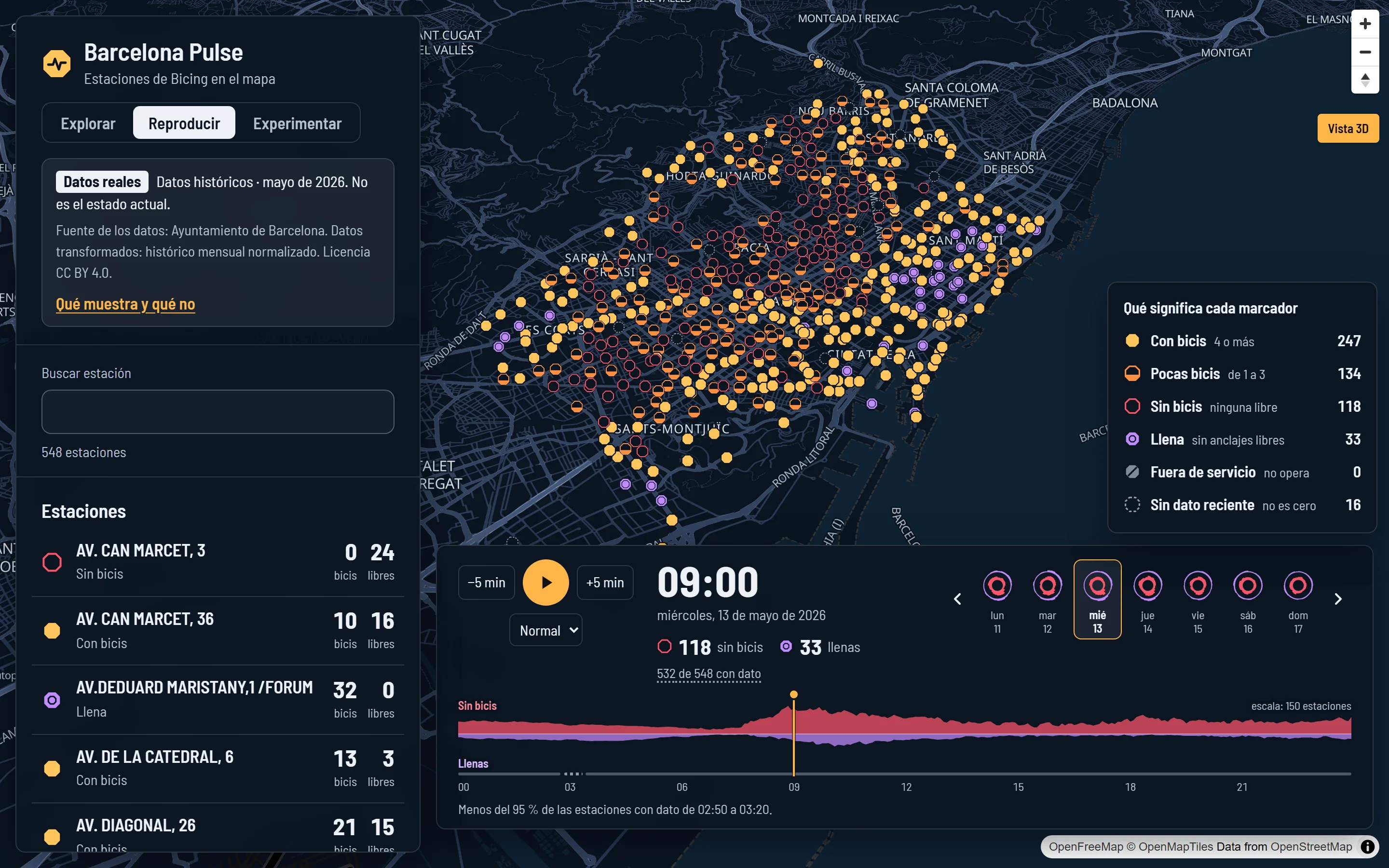
Barcelona Pulse, with real public data
A map of Barcelona’s Bicing bike-share built on the City Council’s open data: a whole day step by step and which areas would be close to a new station, always saying what it knows and what it doesn’t. Coded with AI assistance; the decisions and the review are mine. The app is in Spanish.
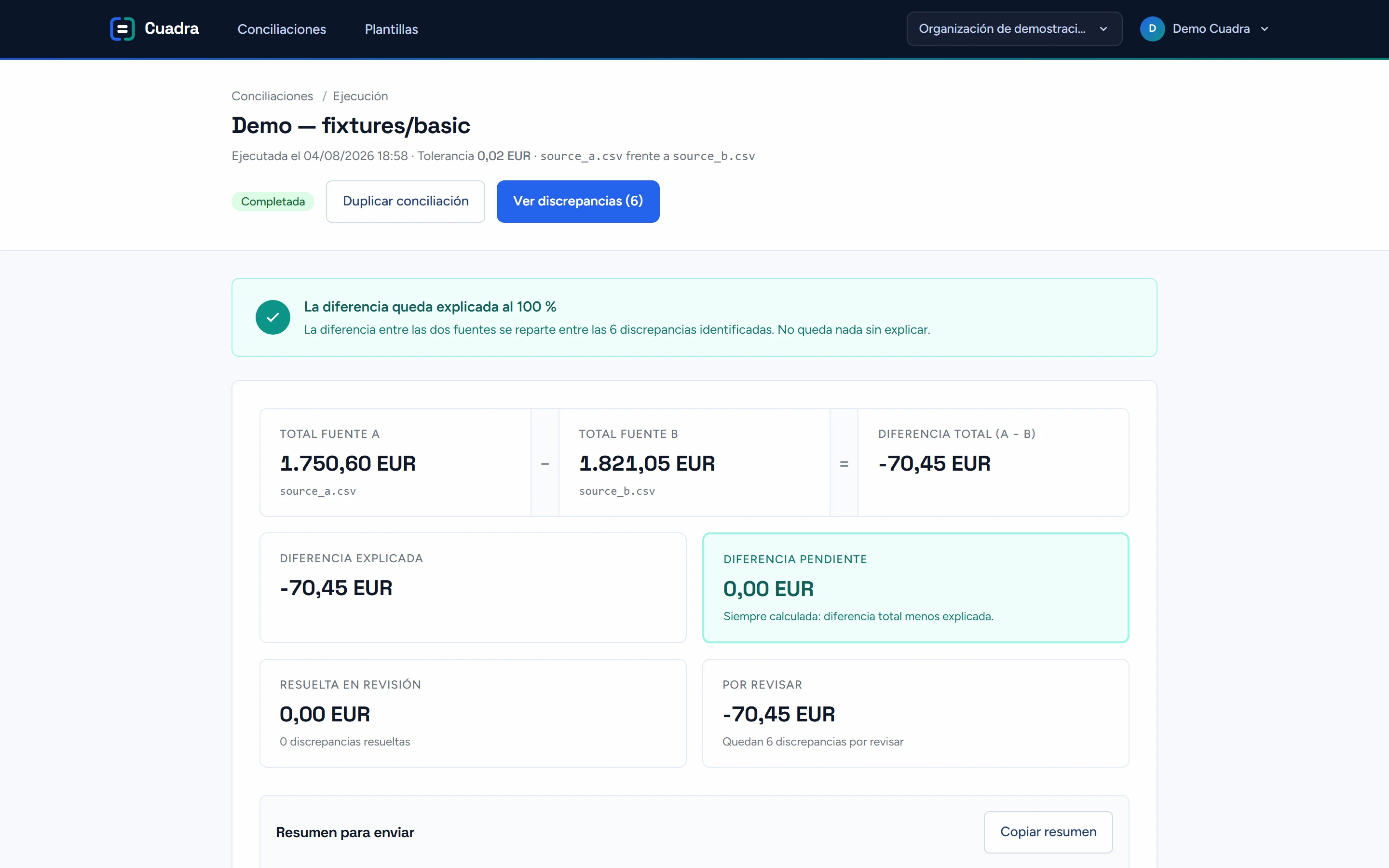
Cuadra, from start to finish
A personal project that compares two lists, such as the bank statement and the invoices, and tells you what matches, what’s missing and what doesn’t add up. I designed, built, tested and launched it myself.
How I build software
The same four phases as a website, with your team involved from the start.
Understand how you work
You show me the process as it is today: who does what, with which tools and where it gets stuck.
You get: a written summary of the process and of what the software would do.
What’s in and what it costs
I set out what goes into the first version, what comes later and what it costs.
You get: a fixed quote, with what’s in and what isn’t, in writing.
Build it in stages
I start with what takes up most of your time and show you progress, so your team can try it early.
You get: versions you can try before handover.
Launch it
We move over the data that’s needed, I publish it in your name and show you how to use it.
You get: the software up and running, and a walkthrough for the team.
What’s yours
The software, the data and the server it runs on are in your name. If one day you want someone else to look after it, they take everything with them.
After handover, you look after it yourself or we agree on maintenance: backups, updates and changes. No lock-in.
Common questions
How much does custom software cost?
It depends on how many screens and processes it has, whether data has to be brought in from elsewhere and which programs it connects to. You get a fixed quote in writing before we start.
What if there’s already software that does it?
Then that’s probably the better choice, and I’ll tell you so. Custom software pays off when what exists doesn’t fit how you work, or gets expensive with so many users.
Do I have to install anything?
No. It runs in the browser, on a computer or a phone, and everyone logs in with their own account.
Can I start small?
Yes, and it’s usually best: a first version with what takes up most of your time, then expand it once you’re using it.
Is your team working with spreadsheets that can’t keep up?
Tell me how you work today and what you’d like to solve. I’ll tell you whether custom software makes sense or whether something that already exists will do.
Tell me what you needor message me on WhatsApp